
Common failures and solutions of the control panel in hydraulic pipe benders
author: Huashun Machinery
2025-04-29

1. Control Panel Won’t Start
Possible Causes:
- Power is not connected or the power switch is faulty.
- The fuse in the control panel is blown.
- Loose or disconnected power wiring.
Solutions:
- Check if the power is connected and ensure the power switch is turned on.
- Inspect the control panel’s fuse; if it’s blown, replace it.
- Verify that the power wiring is secure and there are no disconnections or loose connections.
2. Control Panel Display Issues or No Display
Possible Causes:
- Control panel circuitry is faulty or internal components are damaged.
- The display screen interface is loose or damaged.
- Unstable power input to the control panel.
Solutions:
- Check the control panel’s circuit board for any burnouts or short circuits.
- Inspect the display connections and ensure they are secure with no loose contacts.
- Verify the input voltage is stable and within the working range of the device.
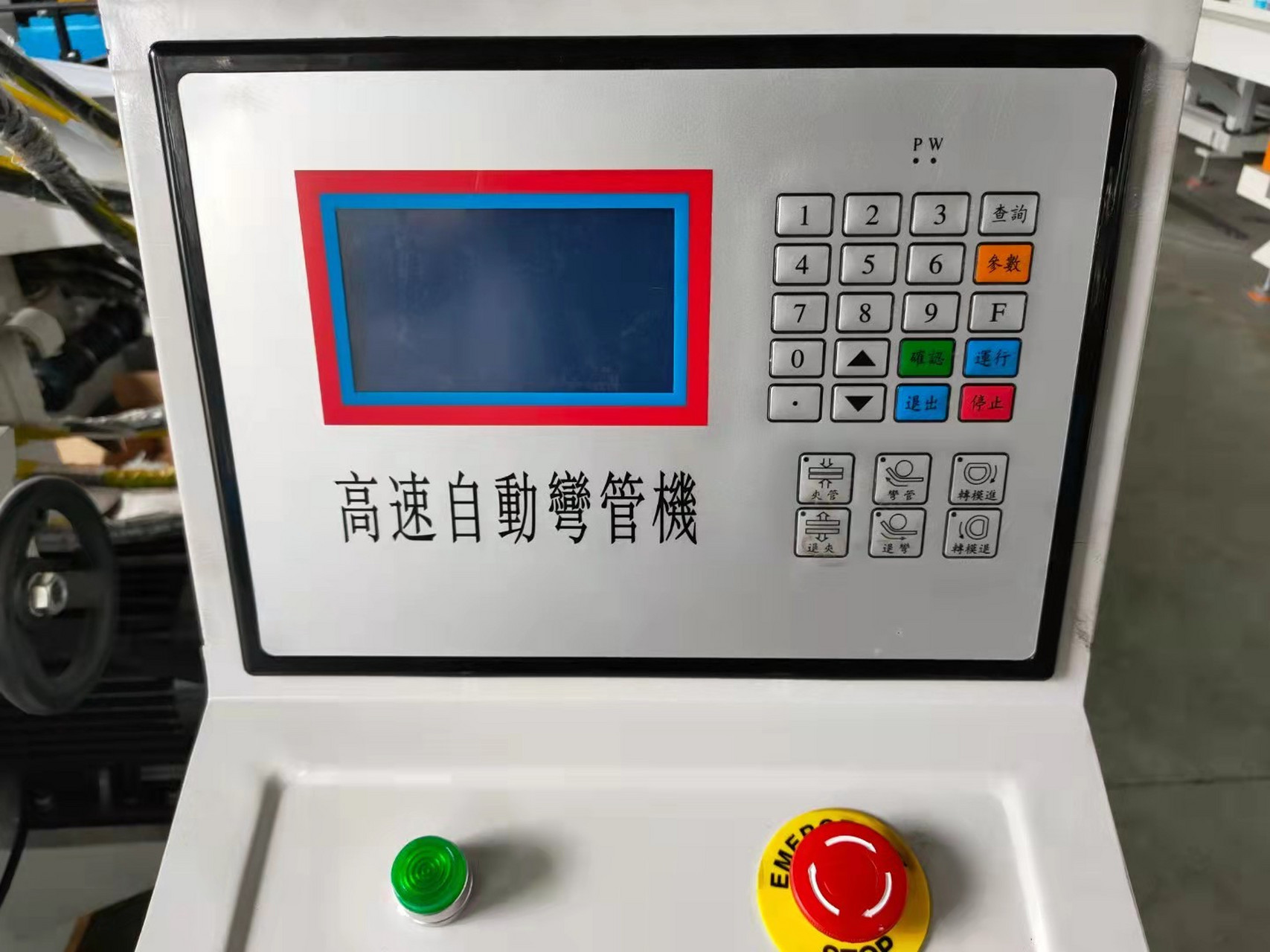
3. Buttons or Touchscreen Not Responding
Possible Causes:
- Faulty button contacts or a non-responsive touchscreen.
- Internal circuitry issues or poor connections in the control panel.
- Dirt or damage on the button surface or touchscreen.
Solutions:
- Clean the buttons or touchscreen to ensure no dirt or grease is affecting their responsiveness.
- Check the button contacts for any looseness, and repair or replace if necessary.
- If the touchscreen is problematic, try recalibrating it, or replace it if recalibration doesn’t work.
4. Delayed or Slow Response from Control Panel
Possible Causes:
- Processor or circuitry failure in the control panel.
- Software errors or system crashes.
- Too many input signals causing the panel to lag.
Solutions:
- Restart the control panel and check if the response improves.
- Inspect the control panel’s internal circuitry for faults and contact a technician if needed.
- Try clearing or restarting the system to reduce input interference.
5. Control Panel Error Alarm
Possible Causes:
- Software malfunction or abnormal input signals.
- Communication failure between the control panel and other machine parts.
- Incorrect system settings or misconfigured parameters.
Solutions:
- Refer to the error code and follow troubleshooting steps or adjust settings as needed.
- Check the wiring between the control panel and other components of the hydraulic tube bender to ensure proper communication.
- Review system settings to confirm that all parameters are correctly configured.
6. Accidental Button Activation
Possible Causes:
- Worn or stuck buttons causing accidental presses.
- Malfunctioning touchscreen areas.
- Faulty internal circuitry or poor connections in the control panel.
Solutions:
- Clean the buttons or touchscreen to ensure no debris is causing issues.
- Check the buttons or touchscreen for damage, and replace them if necessary.
- Inspect the internal circuitry of the control panel to confirm there are no faults or poor connections.
7. Control Panel Displaying Incorrect Status
Possible Causes:
- The control panel is out of sync with the actual machine status.
- Sensor or feedback signal failure leading to inaccurate status display.
- Internal circuitry issues causing incorrect data reading.
Solutions:
- Check the sensors or feedback devices on the hydraulic tube bender to ensure they are functioning properly.
- Restart the control panel to re-sync the system with the machine’s actual status.
- If it’s a circuit issue, contact a technician for repairs.
8. Control Panel Shuts Down or Restarts Automatically
Possible Causes:
- Unstable power supply or voltage fluctuations.
- Overload or excessive heat in the control panel.
- Internal circuitry malfunction.
Solutions:
- Ensure the power supply voltage is stable, and check the power adapter and wiring for any damage.
- Make sure the control panel is properly ventilated to avoid overheating.
- If the circuitry is faulty, it’s recommended to contact a professional technician for repair.
Preventive Measures:
- Regularly inspect the control panel’s power and wiring to ensure there are no loose or damaged connections.
- Keep the control panel clean to prevent dust or grime from affecting its operation.
- Ensure the operating environment is appropriate in terms of temperature and humidity to avoid overheating or moisture damage.
Common failures and solutions of the PLC controller in hydraulic pipe benders
Common failures and solutions of the sensors in hydraulic pipe benders


